onyx works

Results

What we've built, and what changed.

Pick the job you need done. Every story says plainly whether it's in a client's hands, runs our own business, or is still a demo.

Showing all 10 stories

In use

Shows: Catch every call · Follow up until it books · Bring customers back

A photographer who runs the studio alone

  • Voice AI
  • Lead engine
  • Follow-up
  • Reviews
  • One-screen dashboard
  • Websites
  • Lead capture
  • Custom software

He's the one behind the camera, which means he's the one who isn't at a desk. Inquiries came in by email, phone and DM, and every one of them waited until the last client of the day had gone.

We built him one system he runs from his phone. When the studio line rings mid-session, an AI receptionist picks up, asks the questions he'd ask, and books a call on his calendar. Between sessions he opens one screen. Replies to the morning's inquiries are already drafted. So are first emails to companies the system researched overnight, each with the reason it picked them. He changes a line, taps approve, and goes back to work. Nothing goes out until a person says yes.

Then he put on a paid studio event. We built the page and the ticketing, ran the ads, and followed up with everyone on the waitlist, bring-a-friend note included.

What changed

It went from zero bookings to sold out, days early. Afterward every guest got a thank-you and a review request without anyone remembering to send it, and several took the time to leave 5-star Google reviews.

Everything we built for him
  • A rebuilt website with booking and a contact form that records consent for texts and email.
  • An AI receptionist on the studio line that answers, qualifies and books a call with him.
  • One inbox for web, email and text inquiries, answerable from his phone.
  • A lead finder that researches companies that hire event photographers, scores the fit, and drafts the first email.
  • A quote builder that turns an inquiry into a clean quote he can text or email.
  • An event page with ticketing, ads, and tracking that shows where each booking came from.
  • Waitlist, bring-a-friend and review-request follow-ups that run on their own.

If you're the one doing the work and the one answering the phone, this is the help you've been meaning to hire.

Read the full story

The studio's owner is a close associate of our founder. It was one of our first builds, and we run it like any client's.

Demo screen. Every name is invented.
In use

Shows: Beyond the three

A salesperson at a luxury jewelry house

  • Custom software

His clients buy because he remembers them. But the house gave him one seasonal brochure for all of them: the same cover, the same “Dear client” letter, the same pages. Nothing in it had her name on it.

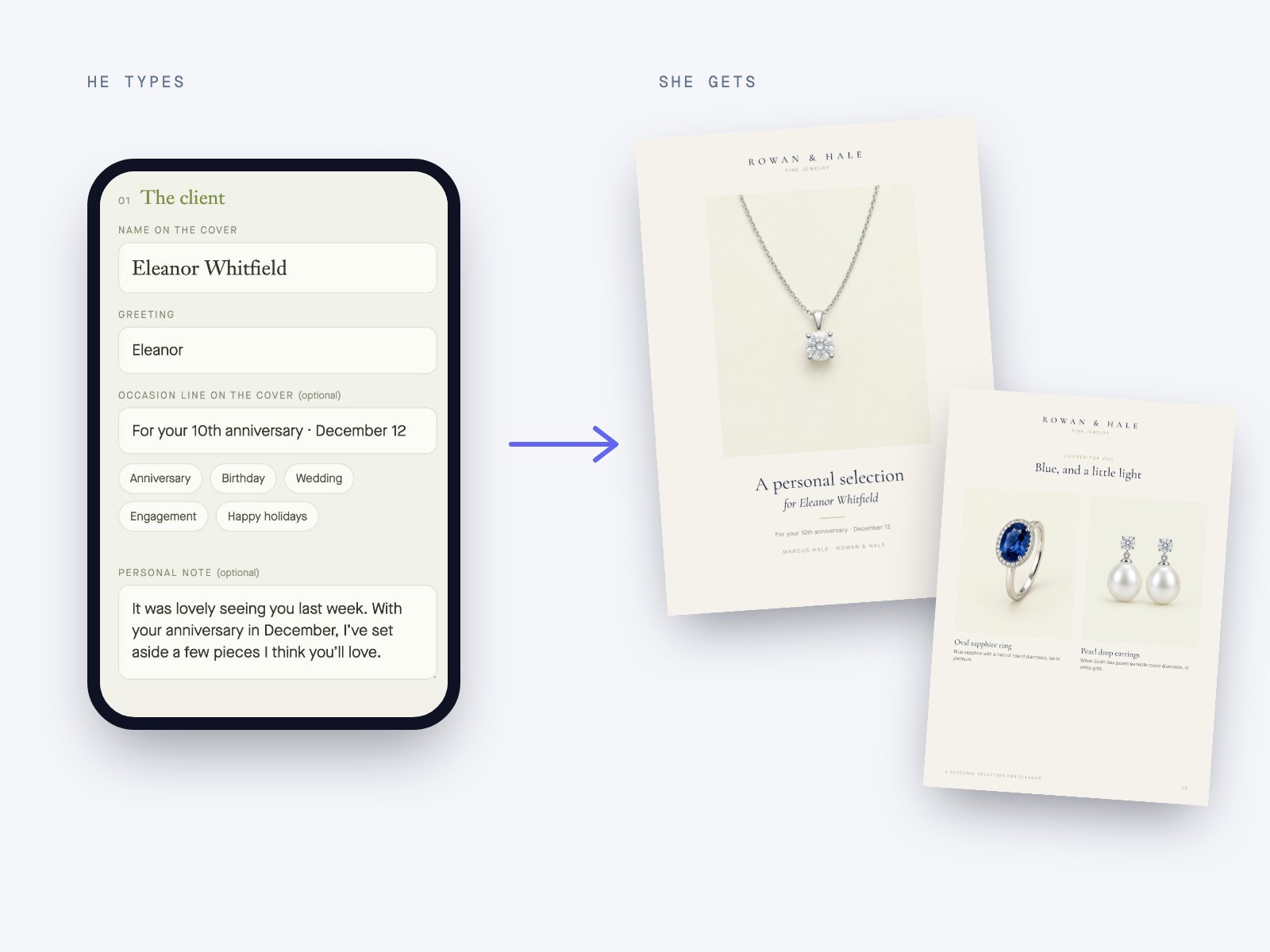
We built him a phone app in an afternoon. After a client visits, he types her name, adds a line about the anniversary she mentioned, and taps the pieces she kept coming back to. A brochure with her name on the cover opens straight into his texts, and it goes out that same evening.

Nothing about the client leaves his phone, and no page shows a price. The price comes up in the conversation.

What changed

He reports more than $10,000 in sales in under a month that came straight from brochures he sent with it.

How it works
  • Opens from his home screen like an app. Nothing to install, nothing to learn.
  • Type a name, add a note (it warns you if the note won't fit), pick the brochures, tap send.
  • Build a new brochure on the phone from a library of pieces, with the letter already written for the occasion.
  • The PDF is made on the phone itself, so no server ever sees a client's name.
  • Built in about four hours. He owns it.

Maybe yours isn't a brochure. It's the proposal you rebuild for every client, the lookbook you put together by hand, the follow-up you mean to send and don't. Tell us the one task you'd hand off if you could.

Read the full story
On the left, a phone form with a client's name, an anniversary line and a personal note. On the right, the personalized brochure it produces, with the client's name on the cover.

Sample brochure. The house and client names are invented.

Built for our own operations

Shows: Catch every call

An owner who can't pick up mid-job

  • Voice AI
  • Lead capture

It answers our own main line today. Here's how a typical home-service company would use it.

Two in the afternoon, both hands on a water heater, and the phone buzzes in his pocket. It's a homeowner with no hot water. She doesn't leave a message. She calls the next name on the list.

We built an AI phone agent for our own line first, because every call we missed was a conversation somebody else got. It picks up on the first ring, day or night, in English or Spanish. It answers the common questions from what you've told it, books the job on your calendar, and texts a confirmation once the caller says that's OK.

If someone says they smell gas, it skips the questions, gives the safety steps and sends the call straight to you. After every call you get a short summary, so you call back the people you choose, already knowing what they need.

What changed

Every call gets answered, including the ones at 9 p.m. and the ones that come in while you're on a ladder. You stop losing work to whoever happened to pick up first.

What it handles
  • Answers every call, nights and weekends included, in English or Spanish.
  • Asks your questions, books the appointment, and texts a confirmation with the caller's OK.
  • Sends urgent calls and existing clients straight to your phone.
  • Emails you a summary and saves it to the contact, so nothing lives only in someone's memory.
  • Says plainly that it's an AI assistant. Callers aren't fooled, and they don't need to be.

The fastest way to know if it would work for your callers is to be one.

Read the full story

Demo call. The business and caller are invented.

Hear a sample call

A recreated call with AI voices. The company and the caller are made up. It shows how a call goes, not a real customer.

More we've built

Demo screen. Every name is invented.
Built for our own operations

Shows: Beyond the three

Owners who aren't at a desk all day

  • One-screen dashboard
  • Custom software

The phone app we run our own business on, and the one the photographer above runs his studio on every day. Whatever needs you is on one screen, wherever you are.

Before and after

Before. To know what needed you, you had to sit down at a computer and open five tools. Anything that came in while you were out waited until you got back.

After. New inquiries, replies waiting for your OK, missed calls with transcripts, and the day's call list for your appointment setters with their scripts beside it. You approve, reply or call back from the parking lot, even on the days you're at another job.

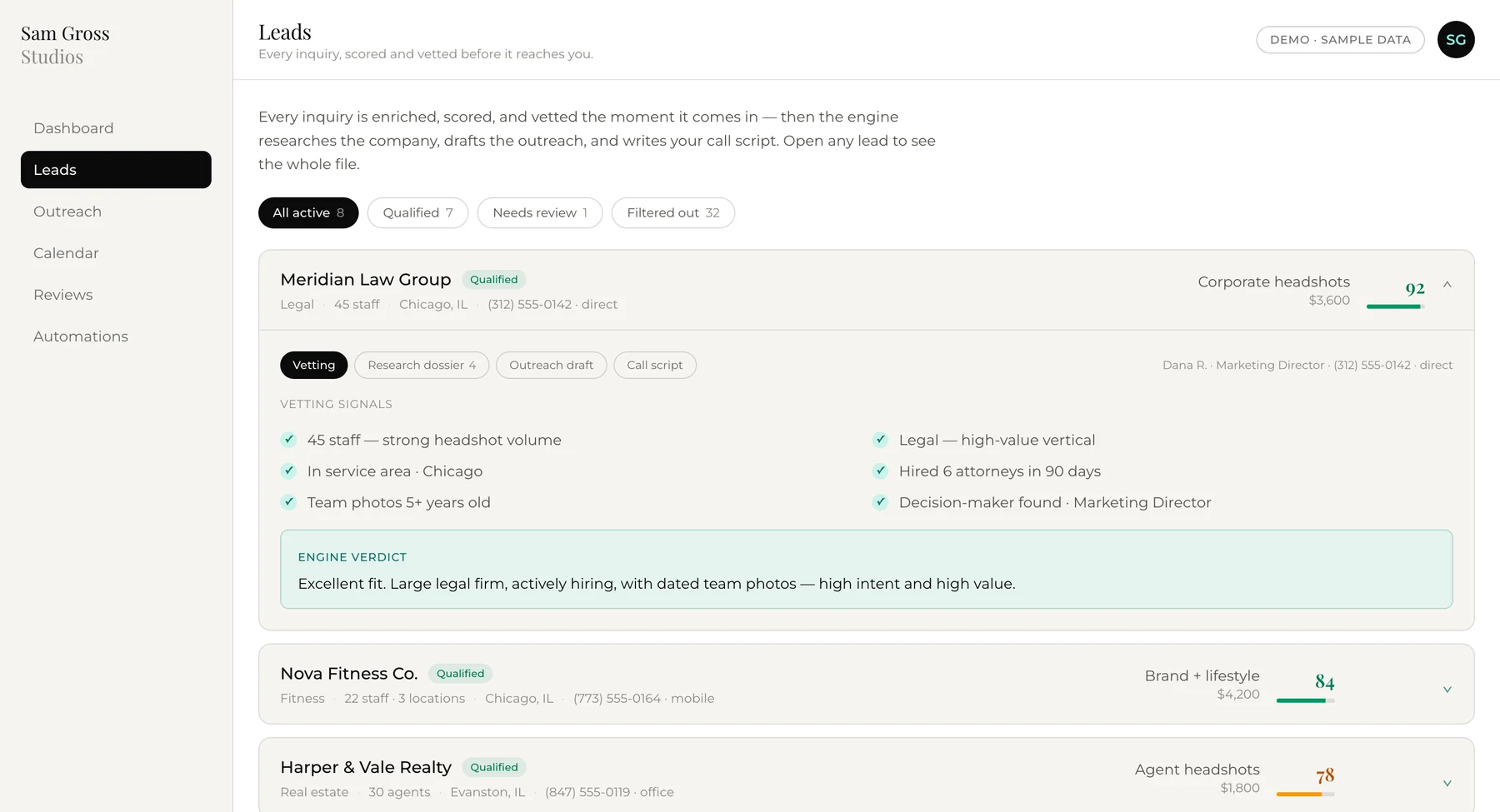
The lead engine dashboard listing scored companies, each with a fit score and a short reason
Demo data. Every company is invented.
Built for our own operations

Shows: Bring customers back · Follow up until it books

B2B service firms that need more of the right customers

  • Lead engine
  • Follow-up

Finds businesses that match your ideal customer, researches each one, scores the fit honestly with its reasons, and drafts the first email. Nothing is sent without your say-so.

Before and after

Before. Prospecting meant evenings on Google Maps, a spreadsheet, and guessing who might need you.

After. Chains and franchises filtered out, every company researched, the best fits on top with a first email ready to read. Your time goes to the conversations.

Demo screen. The business and posts are invented.

Built for our own operations

Shows: Beyond the three

Owners who know they should post and never get to it

  • Content

A planning and drafting tool that writes a month of posts, captions, video outlines and blog articles in your voice. You approve the calendar before anything is scheduled.

Before and after

Before. Posting happened when there was a free evening, which meant it mostly didn't.

After. A month planned in one sitting, drafts that sound like you, and one review a week. It's a tool you own and run, not an agency posting for you.

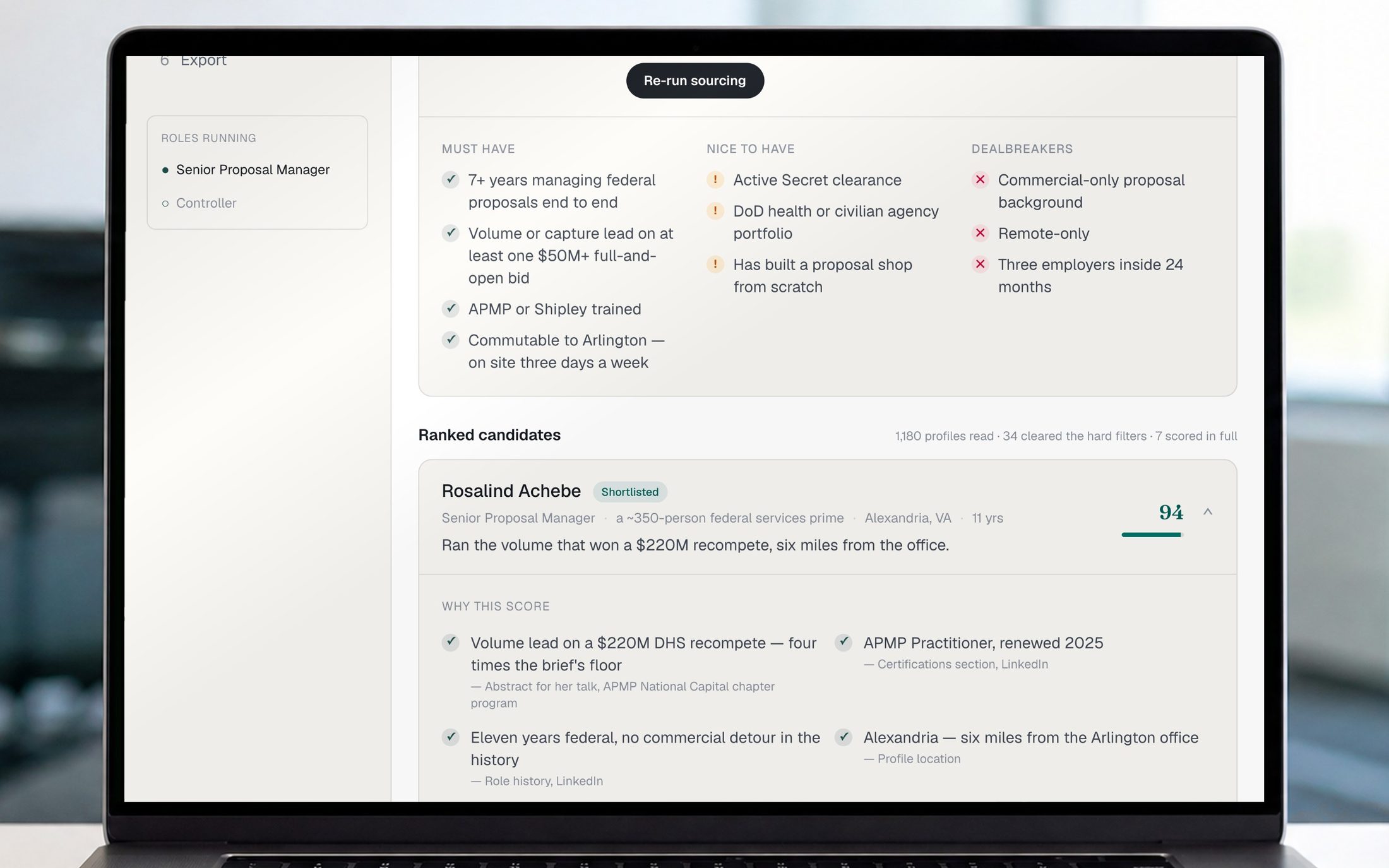
The hiring pipeline on a laptop in a recruiting office, showing ranked candidates
Demo data. Every candidate is invented.
Built for a client

Shows: Beyond the three

A staffing firm that's always hiring

  • Lead engine
  • Custom software

Finds people who fit the jobs you're hiring for, ranks each one against the job line by line, and lines them up for a recruiter to call.

Before and after

Before. Recruiters spent their mornings searching and sorting before they ever picked up the phone.

After. The morning starts with a ranked list and the reasons behind each name. The time goes to calls.

Built for our own operations

Shows: Catch every call

Any business with a website

  • Chatbot
  • Lead capture

A chat helper that answers visitors' questions and books calls, day or night. It's running on this page right now.

Before and after

Before. Visitors with one quick question left the site without asking it.

After. They get the answer on the spot, and the ready ones book a call before they leave.

In development

Shows: Beyond the three

Event photographers

  • Custom software

Vyvant puts photos in a gallery as they're shot. A guest takes a selfie, finds their own photos in seconds, and gets a private link to keep.

Before and after

Here's how a typical event photographer would use it.

Before. Guests waited days for a gallery, then scrolled through hundreds of strangers to find themselves.

After. Guests find their photos while they're still at the event, and the photographer never sorts a single folder by hand.

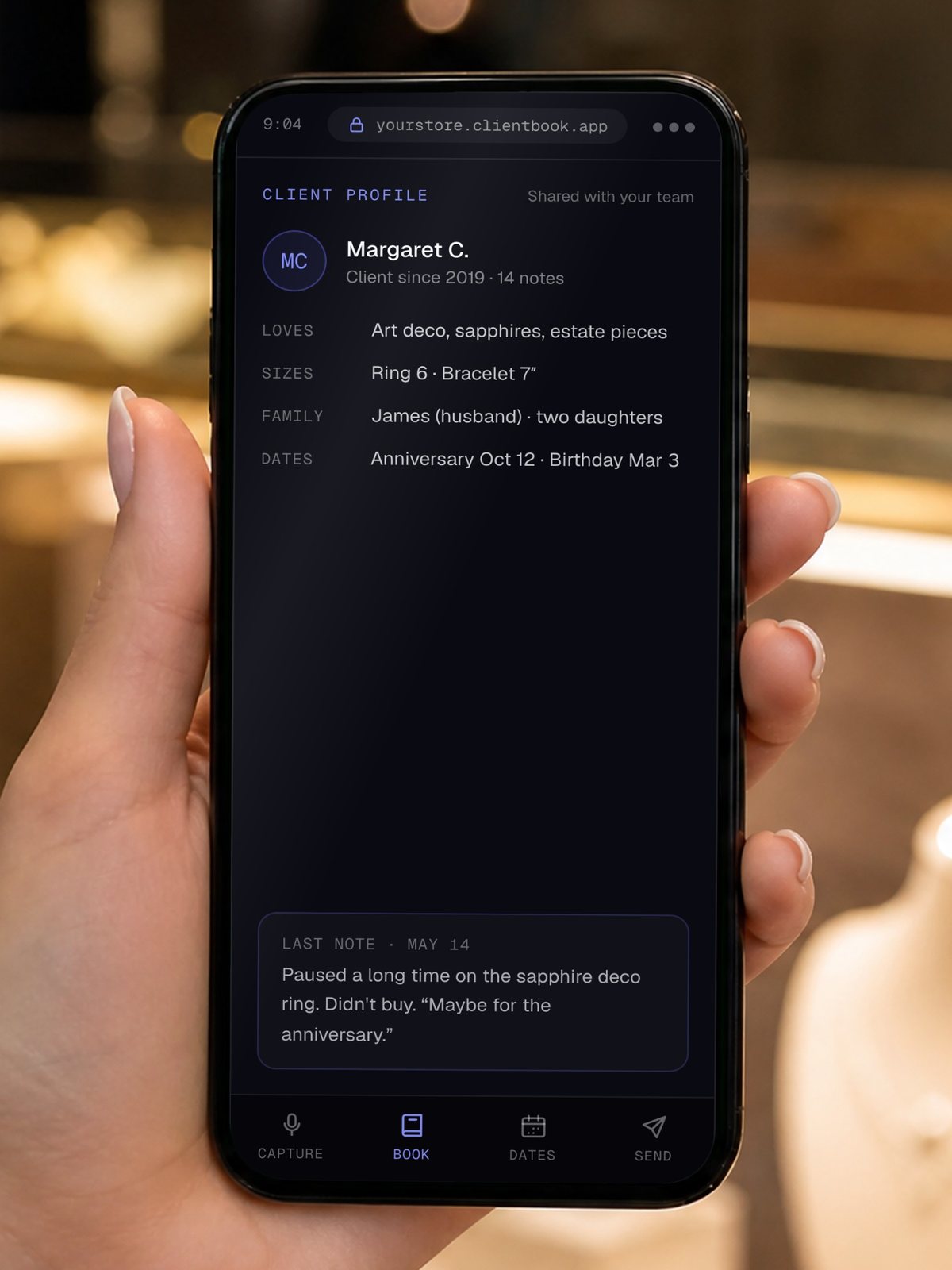
The Client Book open on a phone at a jewelry counter, showing a client profile
Sample client.
Working demo

Shows: Bring customers back · Beyond the three

Fine jewelers and their sales staff

  • Custom software
  • Follow-up

A client memory app. It remembers anniversaries, ring sizes, family details and what each client looked at, then tells staff when to reach out and drafts the note.

Before and after

Here's how a typical jeweler would use it.

Before. Client details lived in one salesperson's head, or in a notebook that left when they did.

After. Every salesperson knows the anniversary is in three weeks and what she tried on in the spring, and the note is ready for them to send.

We also build premium websites, missed-call text-back, online booking and intake forms, follow-up texts and emails, review requests, and plain-language reports on what's working.

Book a 15-minute call